03 kafka 기본개념
03 kafka 기본개념
1. kafka
1. kafka의 기본구성
- 구성
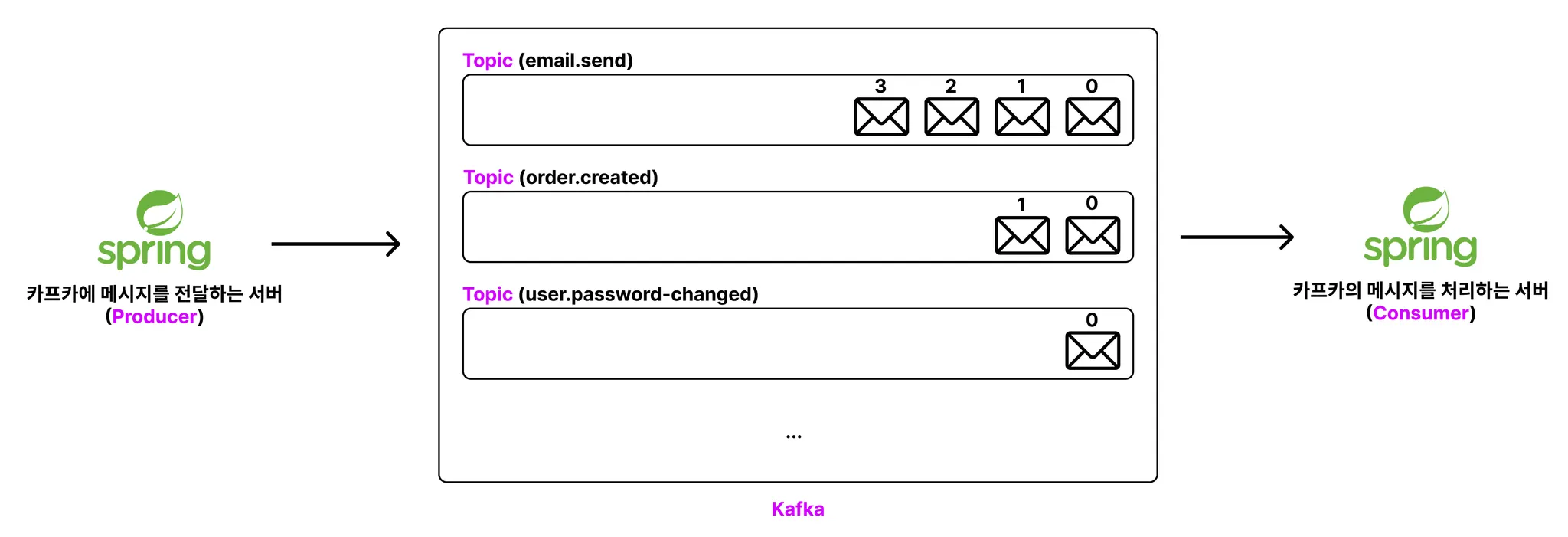
- 프로듀서(Producer) : 카프카에 메시지(데이터)를 전달하는 주체
- 컨슈머(Consumer) : 카프카의 메시지(데이터)를 처리하는 주체
- 토픽(Topic) : 카프카에 넣을 메시지의 종류를 구분하는 개념 (≒ 카테고리)
- 흐름
- 프로듀서는 Kafka로 메시지(데이터)를 전달
- Kafka는 메시지 큐에 토픽 별로 구분해 전달받은 메시지를 저장
- 컨슈머는 Kafka에 새로운 메시지가 생겼는 지 주기적으로 체크
- 새로운 메시지가 있다는 걸 발견하면 그 메시지를 조회해와서 처리
2. Kafka Topic 생성(CLI)
1. 토픽 생성하기
1
2
3
4
5
6
7
8
9
10
 # kafka 디렉터리 안에서 아래 명령어를 실행시켜야 함
 $ cd kafka_2.13-4.0.0

 # 토픽 생성
 # bin/kafka-topics.sh --bootstrap-server <kakfa 주소> --create --topic <토픽명>
 # bin/kafka-topics.sh --bootstrap-server localhost:9092 --create --topic email.send
 $ bin/kafka-topics.sh
 	 --bootstrap-server localhost:9092   # 로컬호스트:9092 서버에서
	 --create  # 만들건데
	 --topic email.send #email.send라는 토픽을
2. 토픽 조회
1
2
3
4
5
6
7
8
9
10
11
12
13
 # 토픽 전체 조회
 # bin/kafka-topics.sh --bootstrap-server <kakfa 주소> --list
 # bin/kafka-topics.sh --bootstrap-server localhost:9092 --list
 $ bin/kafka-topics.sh # 토픽 쉘스크립트
 	 --bootstrap-server localhost:9092 #9092 포트
	 --list # 리스트

 # 특정 토픽 세부 정보 조회
 # bin/kafka-topics.sh --bootstrap-server <kakfa 주소> --describe --topic <토픽명>
 # bin/kafka-topics.sh --bootstrap-server localhost:9092 --describe --topic email.send
 $ bin/kafka-topics.sh \ # 토픽 쉘스크립트
 	 --bootstrap-server localhost:9092 \ #9092포트
 	 --describe --topic email.send # email.send에 대해서 세부조회함.
3. 토픽삭제
1
2
3
4
5
6
 # 토픽 삭제
 # bin/kafka-topics.sh --bootstrap-server <kafka 주소> --delete --topic <토픽명>
 # bin/kafka-topics.sh --bootstrap-server localhost:9092 --delete --topic email.send
 $ bin/kafka-topics.sh \
 	 --bootstrap-server localhost:9092 \
	 --delete --topic email.send
3. Kafka 메시지넣기(CLI)
1. Memo 토픽이 없으면
- email.send 토픽 생성후 넣어야함.
- Key+value 형태도 가능하고 value로만 넣을 수도 있음.
2. 메시지 넣기
1
2
3
4
5
6
7
8
9
10
11
12
  # email.send라는 토픽에 메시지 넣기
  # bin/kafka-console-producer.sh --bootstrap-server localhost:9092 --topic email.send
  $ bin/kafka-console-producer.sh \
    --bootstrap-server localhost:9092 \
    --topic email.send

  # 위 명령어 입력 후 넣을 메시지 내용 입력하고 Enter 누르기
  hello1
  hello2
  hello3

  # 입력 다 했으면 Ctlr + c로 입력 상태 종료하기
3. 메시지 조회
1
2
3
4
5
6
 # email.send라는 토픽에 있는 메시지 꺼내기
 # bin/kafka-console-consumer.sh --bootstrap-server localhost:9092 --topic email.send --from-beginning
 $ bin/kafka-console-consumer.sh \
	 --bootstrap-server localhost:9092 \
	 --topic email.send \
	 --from-beginning # 토픽에 저장된 가장 처음 메시지부터 출력
4. Kafka 컨슈머 그룹
1. Memo
- 컨슈머(Consumer) : 카프카의 메시지를 처리하는 주체
- 컨슈머 그룹(Consumer Group) : 1개 이상의 컨슈머를 하나의 그룹으로 묶은 단위
- 오프셋(offset) : 메시지의 순서를 나타내는 고유 번호 (0부터 시작)
2. 흐름
- 오프셋(offset) 번호는 인덱스처럼 0부터 시작한다.
- 컨슈머 그룹(Consumer Group)은 1개 이상의 컨슈머(Consumer)를 가질 수 있다.
- 컨슈머 그룹(Consumer Group)은 어디까지 메시지를 읽었는 지에 대한 정보(
CURRENT-OFFSET)를 알고 있다.CURRENT-OFFSET: 다음에 읽을 메시지의 오프셋 번호
3. 컨슈머 그룹을 지정해서 읽기
1
2
3
4
5
6
7
8
 # 컨슈머 그룹을 활용해 메시지 조회하기
 # 그룹이 없었다면 그룹을 생성함.
 # bin/kafka-console-consumer.sh --bootstrap-server localhost:9092 --topic email.send --from-beginning --group email-send-group
 $ bin/kafka-console-consumer.sh \
	--bootstrap-server localhost:9092 \
	--topic email.send \
	--from-beginning \ # 컨슈머 그룹에 기존에 읽은 정보가 없으면 처음부터 시작함.
	--group email-send-group # 읽을 그룹을 설정함.
4. 컨슈머 그룹 조회
1
2
3
4
5
6
7
8
9
10
 # 컨슈머 그룹 전체 조회하기
 # bin/kafka-consumer-groups.sh --bootstrap-server localhost:9092 --list
 $ bin/kafka-consumer-groups.sh \
	--bootstrap-server localhost:9092 \
	--list

 # 세부정보
 # 여기에서 offset 번호가 나옴
 # 기존에 읽은 번호가 10번이면, offset은 11번으로 표기됨.
 $ bin/kafka-consumer-groups.sh --bootstrap-server localhost:9092 --group email-send-group --describe
This post is licensed under CC BY 4.0 by the author.